Intro to DAWs (Digital Audio Workstations)

J. Jordan • October 6, 2021

An Introduction to Digital Audio Workstations (DAWs)

 Producing music is becoming more accessible than ever. What was once only achievable in the studio can now be created at home using music production software called Digital Audio Workstations - or DAWs for short!

DAWs can utilize both audio recordings as well as synthesized sounds better known as MIDI. When producing music, DAWs aid in the process of arranging these audio and MIDI pieces into songs into the cohesive music heard anywhere.

Every DAW can seem quite different, but they all ultimately work towards the same goal - creating a song! At Sunburst, we most commonly use Apple's Logic / GarageBand software as well as Ableton Live. There are other great options such as FL Studio or ProTools as well. For now, let's take a look at the layouts of both Logic and Ableton.

Apple Logic

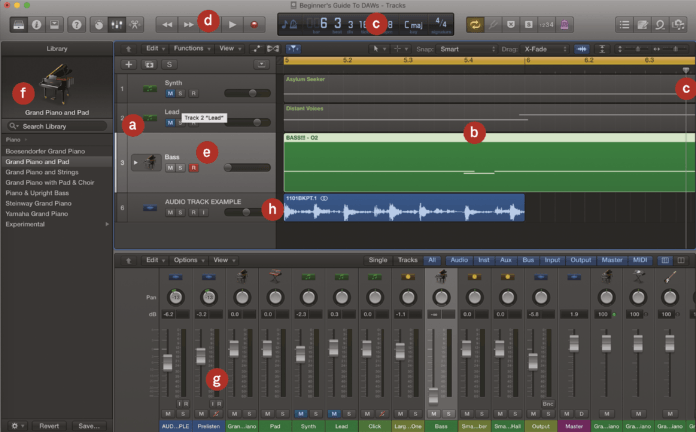
A. Tracks – Your song comes together track by track. In this case, we’re showing four different tracks labelled Synth, Lead, Bass, and Audio


B. The song – This is shown in the main arrangement window, where you can see the information – notes, etc – as data that corresponds to the tracks on the left


C. Timings and bars – As this song plays, it moves from left to right (indicated by the pointer). The window at the top shows your song position in bars, or minutes and seconds


D. Transport controls – You can move the song pointer (C) by pressing various transport controls for play, record, rewind or fast-forward


E. Instrument track – You have either instrument tracks or audio tracks. In this particular project, Logic is triggering one of its own onboard piano emulations


F. Instrument – This instrument comes from Logic’s own library, which is listed on the left of the screen. You can load in instruments here, or via the mixer


G. The mixer – And here is the mixer. Virtual faders allow you to adjust the volume levels of each track, by clicking and dragging them up or down with your mouse


H. Audio track – The other type of track is an audio track and the audio information is shown as a graphical wave (white on blue representing sound waves of varying volumes)

Ableton Live

A. Tracks – Like other DAWS, Ableton Live has audio and MIDI/instrument tracks. But rather than running top to bottom, they run left to right


B. Clips – The software uses ‘clips’ within these tracks, which you can click on and they will play together or loop to make a song or live performance


C. Audio clip – Most clips shown here are MIDI clips triggering internal plug-in instruments, but here’s an audio clip triggering the drum loops shown at the bottom of the screen


D. Effects – Live comes packed with effects and you can have several per track as standard. When selected, they also appear in the bottom window


E. The mixer – As with Logic, the main mixer is a virtual set of faders and dials used to adjust volume of the tracks


F. Main browser – You load in all of your audio, samples, plug-in effects and instruments via this main browser


G. Other instruments – As well as the effects shown in (D), Live’s instruments and other devices pop up here when you click on the relevant track or icon


H. Arrange view – Here, you can flip Live into an Arrangement View. This will show tracks much like Figures A and B in Apple Logic.


As you can see, while DAWs may look different or feature different tools / abilities, their layout is very similar.
It's up to YOU - the producer - on how you want to use it!

February 1, 2026
Catch up on Sunburst’s latest news: Summer Camps, the Sunburst Cabaret, free classes, upcoming events, and more!
January 2026 newsletter icon
January 1, 2026
Catch up on Sunburst’s latest news: Summer Camps, Music Together enrollment, the Sunburst Band Program, upcoming concerts, staff updates, and more!
Musicians Gift Guide
By Alex Stanton December 9, 2025
The holidays are fast approaching and you’re trying to find the best gift for all of the amazing musicians in your family. There’s a lot of noise out there, but we at Sunburst are HEAR to help!
The Sunburst House Band students
December 1, 2025
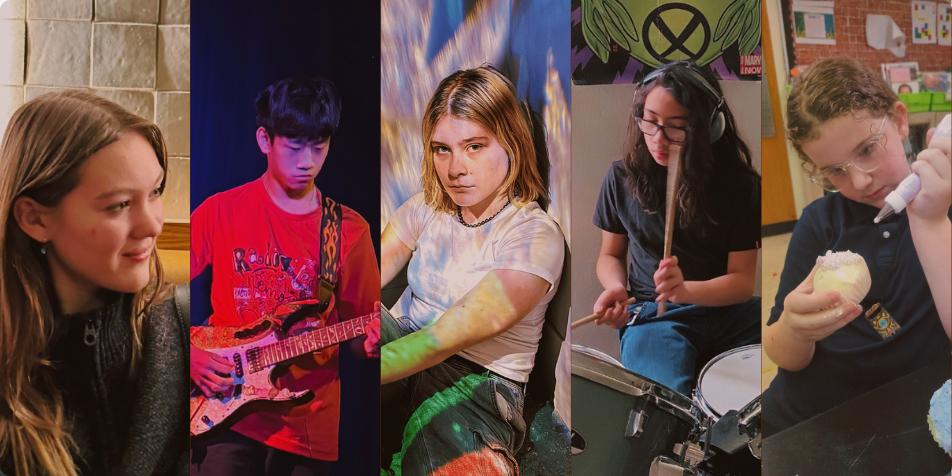
Get to know the Sunburst House Band for the 2025-2026 school year!
December newsletter
December 1, 2025
Catch up on Sunburst’s latest news: our Holiday Gift Guide, House Band introductions, annual Winter Party, free classes this month, new staff members, and more!
Sunburst News
November 1, 2025
Catch up on Sunburst’s latest news: Winter Recitals, Sunburst Sessions, free classes this month, new staff members, and more!
2025 Winter Recitals
October 29, 2025
Signups for our 2025 Winter Recitals are now open! We’re inviting all students to take part in this special event. If it’s your first recital, we’ll walk you through everything you need to know. Learn more about our 2025 Winter Recitals here!
October Newsletter Icon
October 1, 2025
Catch up on Sunburst’s latest news: Free trial lessons this month, Halloween festivities, free music classes, and upcoming concerts!
September News
September 1, 2025
Catch up on Sunburst’s latest news: The Sunburst Band Program, Music Together classes, community drum circles, free music classes, new instructors, and upcoming concerts!
Sunburst News
August 1, 2025
Catch up on Sunburst’s latest news: All Together Now Music Festival, the Sunburst Band Program, community drum circles, free music classes, new staff members, and upcoming events!
Show More